A blockchain explorer is a search engine and browser for a blockchain. It takes the raw, machine-readable data sitting in a distributed ledger and turns it into pages a human can read you paste in a transaction ID, wallet address, or block number, and it shows you what happened.
Think of it as the public reading room for a database that has no owner. Anyone can look up anything, without permission, without an account, and without holding any crypto.
Why do blockchain explorers need to exist?
A blockchain node doesn’t store data in a friendly form. It keeps blocks as serialized binary, with balances and state held in key-value stores optimized for validation speed, not for questions like “Show me every transaction this address has ever made.” There’s no built-in index by address, no search, and no API for browsing.
So explorers do the work of reorganizing that raw data into something queryable. Here’s the pipeline:
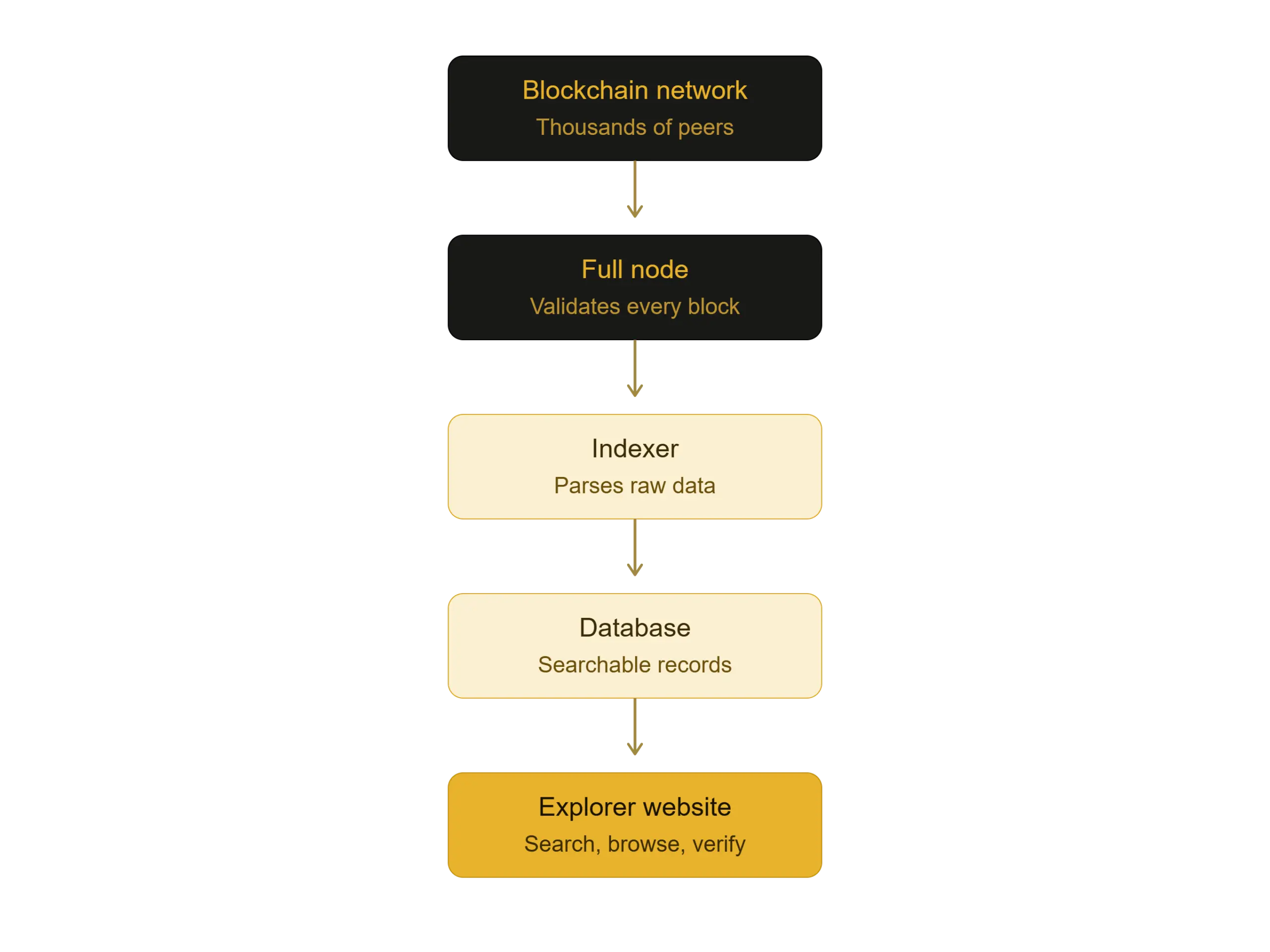
The critical point: the blockchain explorer runs its own node, so it’s reading the same chain everyone else is. It isn’t a trusted intermediary telling you what happened; it’s a convenient window onto data you could verify yourself if you ran a node.
What can you look up?
- By transaction hash (TXID): a unique 64-character fingerprint of a transaction. This is what you’d share with someone to prove you sent them money.
- By wallet address: full history of every transaction in and out, current balance, and tokens held.
- By block number or hash: every transaction bundled into that block, who mined or validated it, the timestamp, and the block size.
- By token contract: total supply, holder count, transfer history, and for verified contracts, the actual source code.
- By ENS or domain name: human-readable names like vitalik.eth resolve to addresses.
Reading a transaction page
This is where most people get lost, so worth breaking down what the fields mean:
| Field | What it tells you |
| Status | Success, pending, or failed. A failed transaction still burns fees. |
| Block | Which block it landed in. “Blank” means it’s still in the mempool. |
| Confirmations | How many blocks have been mined since? More confirmations = harder to reverse. |
| Timestamp | When it was included, not when it was sent. |
| From / To | Sender and recipient addresses. “To” may be a contract, not a person. |
| Value | Native coin transferred. Often zero for token transfers. |
| Transaction fee | What the sender paid to get included. |
| Gas used / gas price | On Ethereum-style chains, computational cost × price per unit. |
| Nonce | Sender’s transaction counter prevents replay and enforces ordering. |
| Input data | The raw payload. For contract calls, this encodes which function was invoked. |
The main blockchain explorers
- Bitcoin: mempool.space (best for fee estimation and mempool visualization), Blockchain.com, Blockstream.info
- Ethereum: Etherscan, the de facto standard. Its clones dominate other EVM chains: BscScan (BNB Chain), Polygonscan, Arbiscan, Basescan, Snowtrace (Avalanche)
- Solana: Solscan, Solana Explorer, Solana FM
- Others: Tronscan (TRON), XRPSCAN (XRP Ledger), Blockchair, and OKLink for multi-chain search
What do people actually use them for?
- Confirming a payment: Someone says they sent you funds. You don’t take their word; you check the TXID on an explorer. This is the single most common use.
- Diagnosing a stuck transaction: Underpriced gas means your transaction sits in the mempool. The blockchain explorer shows you it’s pending and lets you decide whether to speed it up or cancel.
- Vetting a token before buying: This matters enormously in crypto. On Etherscan you can check: is the contract source code verified, how concentrated is the holder distribution, does the liquidity pool have a lock, was the contract deployed three hours ago. A token where the top wallet holds 90% of supply is a rug pull waiting to happen, and the explorer shows you that in about thirty seconds.
- Managing token approvals: When you connect a wallet to a DeFi app, you often grant it unlimited spending permission over a token. Etherscan’s Token Approval Checker lists every approval you’ve ever granted and lets you revoke them. This is basic hygiene most users skip until they get drained.
- Verifying proof of reserves: Directly relevant to your gold article tokenised gold like PAXG and XAUT publishes on-chain supply that you can check against the issuer’s attestation reports. The blockchainexplorer shows total supply; the auditor’s report claims vaulted grams. If those diverge, that’s the story.
- Reading contracts: Verified contracts expose a Read Contract tab (query state for free) and a Write Contract tab (execute functions directly, wallet-connected). Useful when a project’s frontend is down or you don’t trust it.
Limitations worth knowing
- Pseudonymous, not anonymous: Addresses aren’t names, but they’re permanent and public. Once one address is linked to your identity via an exchange KYC, a public donation, or a purchase, your entire transaction history becomes traceable backwards and forwards. Firms like Chainalysis do this professionally.
- Explorers are centralized choke points: The chain is decentralized; Etherscan is a company. It can be blocked, go down, or apply its own labeling and filtering. Trusting an explorer’s display is not the same as verifying the chain yourself.
- Address poisoning and spam: Attackers send tiny transactions from addresses that look nearly identical to ones you’ve used, hoping you’ll copy the wrong one from your history. Similarly, worthless “airdropped” tokens appear on your address page unsolicited, sometimes linking to phishing sites.
- Labels can be wrong or stale: Blockchain explorer tags like “Binance Hot Wallet” are crowdsourced or manually added. Treat them as a hint, not proof.
- Not every chain is equally legible: Privacy chains like Monero deliberately obscure sender, receiver, and amount, so their explorers show far less. Zcash shielded transactions are similar.
Here’s that closing section replaced with types, outlook, conclusion, and FAQs.
Types of blockchain explorers
Not all explorers do the same job. Knowing which kind you’re looking at saves a lot of confusion.
- Single-chain explorers serve one network and go deep. Etherscan for Ethereum, Solscan for Solana, and Tronscan for TRON. These give you the richest feature set contract verification, token approval tools, gas trackers, and developer APIs because everything is purpose-built for that chain’s data model.
- Multi-chain explorers cover dozens of networks from one interface. Blockchair and OKLink let you search an address across chains without switching sites. The trade-off is depth: you get broad coverage but fewer chain-specific tools.
- Layer 2 and rollup explorers are a growing category of their own. Arbiscan, Basescan, and Optimistic Etherscan show L2 activity plus the bridge messages and batch submissions that link back to Ethereum mainnet, something a plain L1 explorer can’t show you.
- Mempool and fee explorers focus on what hasn’t been confirmed yet in the mempool.space on Bitcoin is the best example, visualizing the pending transaction queue and helping you price a fee correctly rather than overpaying.
- Analytics-first explorers like Dune, Nansen, and Arkham sit one layer above traditional explorers. Instead of showing you a transaction, they show you patterns, wallet labelling, fund flows, and protocol-level dashboards. Useful for research, less useful for checking whether a payment landed.
- NFT explorers index token metadata, collection floor activity, and ownership history rather than plain transfers.
- Privacy-chain explorers exist for Monero and Zcash but show far less by design. Sender, receiver, and amount are cryptographically hidden, so the blockchain explorer can confirm a transaction occurred without revealing what it contained.
- Self-hosted open-source explorers such as Blockscout let projects and enterprises run their own instance. This removes the dependency on a third-party company entirely, which matters for anyone who takes the “don’t trust, verify” principle seriously.
Where are blockchain explorers heading?
Explorers have quietly become one of the most important pieces of crypto infrastructure, and several shifts are pushing them forward.
- Human-readable transactions: Raw input data and hex calldata are being decoded into plain language “you approved unlimited USDC spending to this contract,” instead of an unintelligible byte string. This alone would prevent a meaningful share of wallet-drain incidents.
- Cross-chain visibility: As assets bridge constantly between chains and rollups, explorers are being rebuilt to trace a single transfer across multiple networks rather than losing the thread at the bridge.
- Security tooling built in: Contract risk scoring, honeypot detection, holder concentration warnings, and simulated transaction previews are moving from specialist tools into mainstream explorers.
- Real-world asset transparency: As tokenized gold, treasuries, and equities grow, blockchain explorers become the public verification layer for supply that’s supposed to be backed by something physical. This is where the technology’s value proposition becomes obvious to people who don’t otherwise care about crypto.
- Decentralized indexing: Protocols like The Graph are working towards indexing that isn’t dependent on any single company’s servers, which addresses the biggest structural weakness explorers have today.
Conclusion
A blockchain explorer is the thing that makes “public ledger” more than a slogan. Without one, blockchain data is technically open but practically unreadable. the equivalent of a library with no catalogue.
The practical framing is this: an explorer is what lets you verify a claim rather than trust one. If a tokenized gold issuer says a million grams sit in a Swiss vault backing a million tokens, the explorer is where you check the token half of that sentence yourself. If someone says they sent you funds, the explorer settles it. If a new token claims fair distribution, the holder list tells you in seconds.
Learning to read one is probably the highest-value hour a crypto user can spend. It costs nothing, requires no wallet, and turns you from someone who takes claims on faith into someone who checks.
Is a blockchain explorer free to use?
Yes. Browsing, searching, and viewing data on public explorers is free. Some charge for high-volume API access or premium analytics, but the core functionality costs nothing and requires no account.
Do I need a wallet or crypto to use one?
No. Explorers are read-only by default. You only need to connect a wallet if you want to use write functions on a contract, which is optional and rarely necessary for ordinary users.
Can a blockchain explorer see my identity?
Not directly. Explorers show addresses, not names. But addresses are permanent and public, so if one is ever linked to you through an exchange withdrawal, a public donation, a purchase your history becomes traceable. Pseudonymous is not the same as anonymous.
Why does my transaction show as pending?
Usually because the fee was set too low for current network conditions, so validators haven’t prioritised it. On Ethereum it can also mean an earlier transaction from the same wallet with a lower nonce is stuck ahead of it in the queue
Why does my transaction show as pending?
Usually because the fee was set too low for current network conditions, so validators haven’t prioritised it. On Ethereum it can also mean an earlier transaction from the same wallet with a lower nonce is stuck ahead of it in the queue.
Can I edit, cancel, or delete a transaction using an explorer?
No. Explorers only display data. A confirmed transaction is permanent. A pending one can sometimes be replaced by broadcasting a new transaction with the same nonce and a higher fee, but that’s done through your wallet, not the explorer.
Why do I see unknown tokens in my wallet on the explorer?
Anyone can send tokens to any address without permission. Unsolicited tokens are usually spam or phishing bait, often linking to a site designed to drain your wallet. Don’t interact with them.
Is a verified contract the same as a safe contract?
No, and this is a common and expensive misunderstanding. Verification only means the published source code matches the deployed bytecode. It says nothing about whether the code is well written, honest, or free of backdoors.
Which explorer should a beginner start with?
Etherscan if you’re on Ethereum or any EVM chain, since its layout is the industry standard and most other explorers copy it. mempool.space for Bitcoin, particularly for understanding fees.
Can explorers show data from private or permissioned blockchains?
Only if the operator runs and exposes one. Enterprise chains typically run internal explorers with restricted access rather than publishing to the open web.