
If you want to start using SunCrypto for cryptocurrency trading, completing your KYC is an important step after registering your account. KYC, or Know Your Customer, is the process through which your identity and required documents are verified.
SunCrypto provides two ways to complete the KYC process: Auto KYC and Manual KYC. Both options require users to provide and verify their identity details, but the process followed for each option is different. Users can choose the option that suits them and complete the verification process through the SunCrypto application.
In this guide, we’ll explain how to complete KYC on SunCrypto, what documents and details you need, and the step-by-step process for both auto and manual KYC.
What is KYC, and why is it required?
KYC stands for Know Your Customer. It is an identity verification process used by financial platforms and exchanges to verify the identity of their users.
Before starting the KYC process on SunCrypto, you first need to register your account using your mobile number and email ID. Once your registration is complete, you can proceed with KYC verification by submitting the required information and documents.
Completing KYC helps verify that the information associated with your account belongs to you. It also allows you to proceed with the relevant account and trading-related activities supported by the platform.
How to start KYC on SunCrypto?
The first step is the same whether you choose Auto KYC or Manual KYC.
Step 1: Open the SunCrypto app.
- Open the SunCrypto application after completing your registration.
- On the top section of the app, you will find the “Complete Your KYC” option. Click on it to begin the verification process.
- Once you select this option, SunCrypto will provide you with two choices:
- Auto KYC
- Manual KYC
You can select either option to proceed with your verification.
Now, let’s understand both processes separately.
How to complete manual KYC on SunCrypto?
With Manual KYC, you need to provide your PAN card details, an accepted identity proof, and a selfie for verification.
The Manual KYC process consists of three main stages:
- PAN Card
- ID Proof
- Selfie
Let’s look at each step in detail.
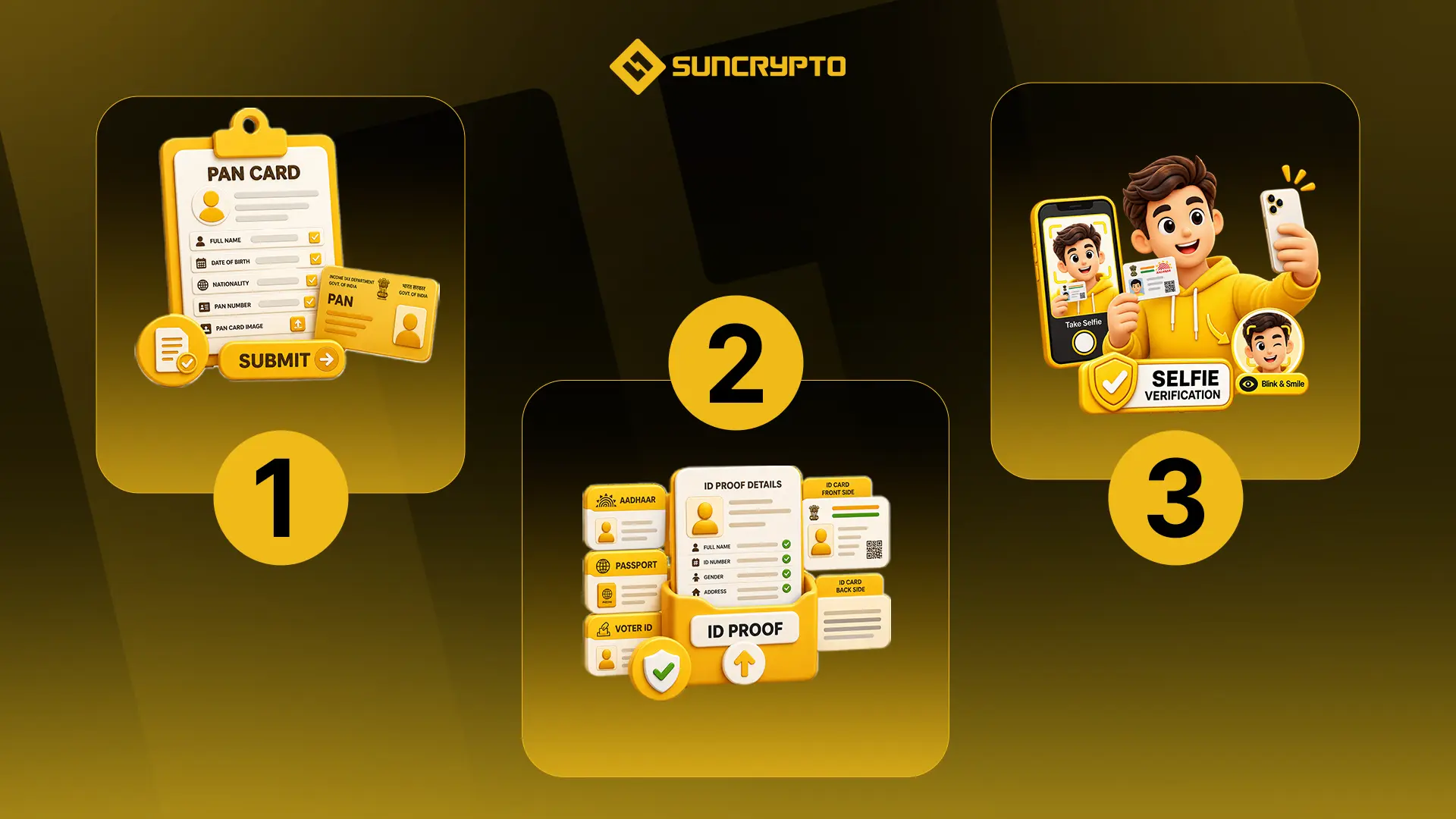
Step 1: Submit your PAN Card details
After selecting Manual KYC, click on the PAN Card option.
You will be asked to provide information such as:
- Full name as mentioned on your PAN card
- Date of birth
- Nationality
- PAN number
- PAN card image
Make sure the information you enter matches the details on your PAN card.
After entering the required information and uploading the PAN card image, review the details carefully and click on Submit.
Your PAN card details will then be sent for verification and will show as being processed.
Step 2: Submit your ID Proof
Once you have submitted your PAN card information, the next step is to provide an identity proof.
Select the ID Proof option. SunCrypto allows users to select from available documents such as:
- Aadhaar Card
- Passport
- Voter ID
Select the document you want to use for verification.
For example, if you choose your Aadhaar Card, you will need to provide the required Aadhaar-related information. This includes details such as your Aadhaar number, gender, permanent address, and current address.
You will also need to upload images of the front and back sides of your Aadhaar card.
After entering all the required information, check the details and click Submit.
Your selected ID proof will then be sent for verification.
Step 3: Complete the selfie verification
The final stage of Manual KYC is selfie verification.
For this step, you need to take a selfie while holding the same ID proof that you submitted during the previous step.
While taking the selfie, make sure your phone is steady and your face and ID proof are clearly visible. Follow the instructions displayed on the screen so that the required information can be captured properly.
Once you have taken the selfie, click on Submit.
After submitting all three components: PAN card, ID proof, and selfie, SunCrypto’s KYC team will review your submitted information and documents.
Once your KYC is approved, you will receive a pop-up notification from SunCrypto confirming the successful completion of your KYC.
How to complete auto KYC on SunCrypto?
If you prefer a more automated verification process, you can choose the Auto KYC option.
The Auto KYC process uses DigiLocker to authenticate your Aadhaar and PAN-related information.
Here is the step-by-step process.
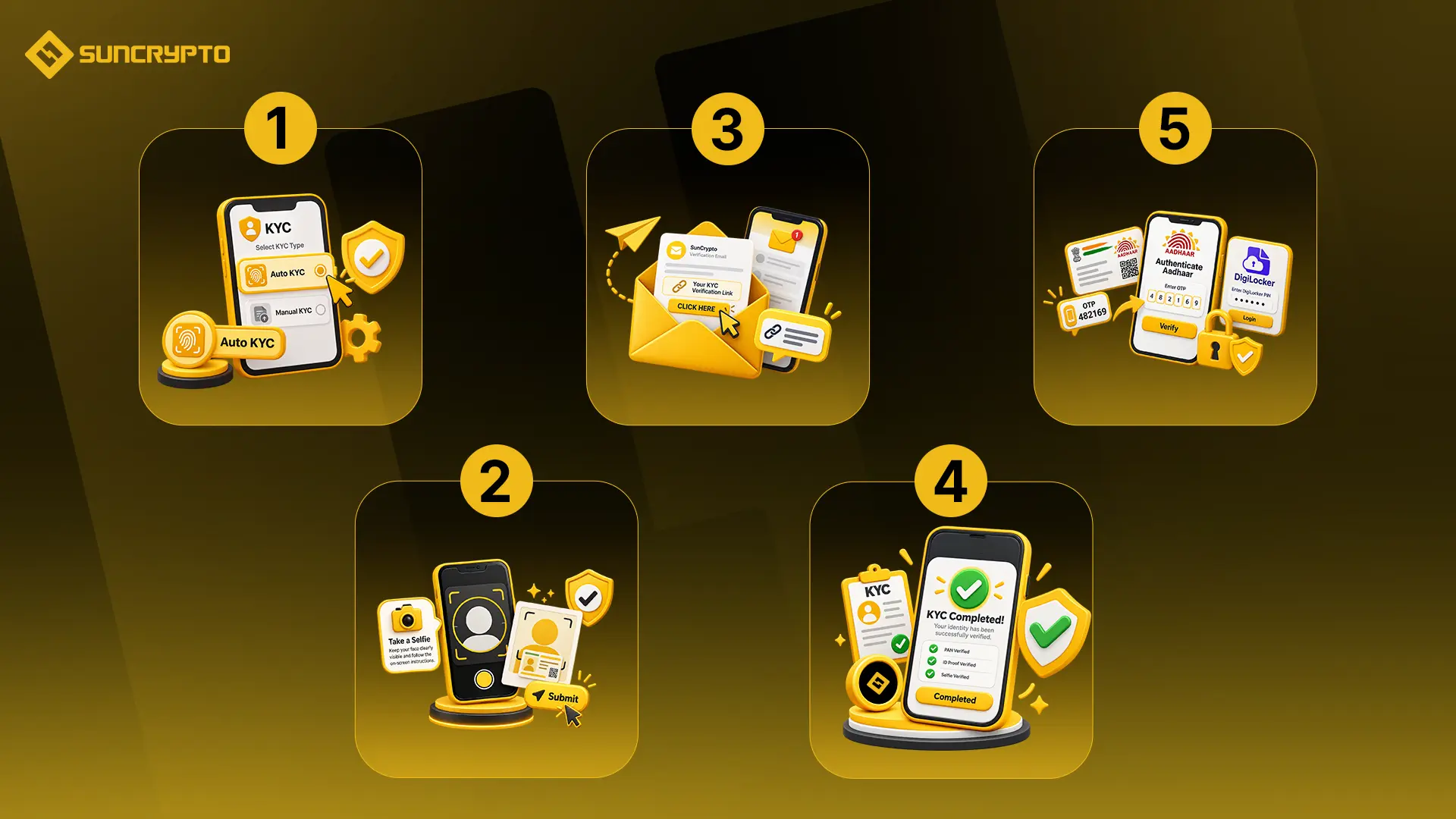
Step 1: Select Auto KYC
- Go back to the KYC section of the SunCrypto app and select Auto KYC.
- SunCrypto will ask you to enter your PAN card number.
- After entering your PAN number, SunCrypto will send a verification link to your registered email ID.
Step 2: Open the Verification Link
- Open the email received from SunCrypto and select “CLICK HERE.”
- You will be redirected to a new page where you can continue the KYC process using DigiLocker.
- Log in to your DigiLocker account using the required credentials.
- After logging in, you will be taken to a page displaying the “Start the KYC Process” option.
- Click on Proceed to continue.
Step 3: Authenticate Your Aadhaar
- DigiLocker will then authenticate your Aadhaar information.
- Select the “Authenticate Aadhaar” option.
- An OTP will be sent to the mobile number linked to your Aadhaar. Enter the OTP when prompted.
- You will then need to enter your DigiLocker PIN to access your documents.
- If you have forgotten your DigiLocker PIN, you can use the “Forgot PIN” option to generate a new one.
Step 4: Complete the Selfie Verification
- Once the required Aadhaar and PAN information has been verified, you will need to complete the selfie verification.
- During this step, you may be asked to blink your eyes at regular intervals so that the system can perform a liveness check and identify that the selfie is being taken by a real person.
- After completing the required action, take your selfie and submit it.
Step 5: Confirm your KYC completion
- After submitting the selfie, you should see a message on the screen confirming that your KYC process has been successfully completed.
- SunCrypto will also send you a confirmation message regarding the successful completion of your KYC.
Auto KYC vs. manual KYC on SunCrypto
Both options can be used to complete your KYC, but the process is different.
| Feature | Auto KYC | Manual KYC |
| PAN verification | Yes | Yes |
| ID verification | Through DigiLocker | User-submitted ID proof |
| Selfie verification | Yes | Yes |
| DigiLocker required | Yes | No |
| Document upload | Automated through verification flow | Required |
| Verification process | Automated | Manual review |
The SunCrypto help article notes that, at the time it was updated, Auto KYC was generally verified faster than Manual KYC. However, actual verification time can vary depending on the verification process and other factors.
Things to keep in mind while completing KYC
To avoid unnecessary issues during verification, make sure that the information you submit is accurate and matches your official documents.
Here are a few things you should keep in mind:
1. Enter Accurate Information: Your name, date of birth, PAN number, and other details should be entered correctly. Carefully review your information before submitting it.
2. Upload Clear Documents: When submitting documents through Manual KYC, make sure the document images are clear and readable. The required information should be visible properly.
3. Use the Correct ID Proof: Select an accepted identity document and provide all the details requested by the application.
4. Take a Clear Selfie: During selfie verification, ensure your face is clearly visible and follow the instructions shown on the screen. For Manual KYC, make sure the ID proof is also visible as required.
5. Check Your Registered Email: For Auto KYC, the verification link is sent to your registered email ID. Therefore, make sure you have access to the email account associated with your SunCrypto account.
What happens after completing KYC?
Once you have submitted all the required information, SunCrypto will process your KYC details.
For Manual KYC, the submitted documents and credentials are reviewed by SunCrypto’s KYC team. Once approved, you receive a confirmation notification.
For Auto KYC, the verification is completed through the automated DigiLocker-based process, followed by selfie verification. Once successful, you receive confirmation on the screen as well as a message from the SunCrypto team.
After your KYC is successfully completed, you can move on to the next steps of setting up your SunCrypto account, such as adding your bank account and depositing funds. SunCrypto’s help centre also provides separate guides for adding a bank account and depositing INR.
Conclusion
Completing KYC is an important step when setting up your SunCrypto account. The platform provides two options, Auto KYC and Manual KYC, so users can follow the verification method available to them.
With Manual KYC, you need to submit your PAN card details, an accepted ID proof, and a selfie. With Auto KYC, you provide your PAN number, continue the verification through the link sent to your registered email, authenticate your Aadhaar through DigiLocker, and complete the selfie verification.
Whichever method you choose, make sure that your details and documents are accurate and clearly submitted. Once the verification is successfully completed, you can continue setting up your SunCrypto account and move on to the next steps.
Disclaimer: Crypto products and NFTs are unregulated and can be highly risky. There may be no regulatory recourse for losses from such transactions. This content is for informational and educational purposes only and should not be considered financial or investment advice. Users should conduct their own research or consult a qualified professional before making investment decisions.
What is KYC on SunCrypto?
KYC, or Know Your Customer, is the identity verification process required to verify the details and documents associated with your SunCrypto account.
What are the KYC options available on SunCrypto?
SunCrypto provides two KYC options: Auto KYC and Manual KYC.
Which documents are required for Manual KYC?
For Manual KYC, you need to submit your PAN card details, an accepted ID proof such as Aadhaar Card, Passport or Voter ID, and a selfie while holding the submitted ID proof.
What happens after my KYC is approved?
Once your KYC is successfully approved, you receive a confirmation notification from SunCrypto. You can then proceed with the next steps of setting up your account, including adding your bank account and depositing funds.